httk quickstart: from a structure to an OPTIMADE API
This walkthrough starts from one structure file and ends with an OPTIMADE API serving the results of a complete set of first-principles calculations, with the provenance of every number. Along the way, httk₂ runs the calculations, writes a report, and collects everything into a database:
- httk-workflow runs atomate2's VASP workflows as jobs: relaxation, band structure, elastic constants, dielectric response and phonons.
- A postprocess script turns the finished calculations into a LaTeX report with figures.
httk collectstores structures, results, files and the runs that produced them in an SQLite database.httk serve optimadeserves that database as an OPTIMADE API.
The outputs shown below come from a real run on diamond. On a cluster with one 32-core node per VASP calculation, the whole characterization took about 50 minutes.
What you need
- VASP and a POTCAR library in pymatgen's layout.
- Python 3.12 or newer.
Install httk₂ and the atomate2 workflow packages. The packages are a git repository; installing them with pip also installs atomate2, phonopy and seekpath, and makes the workflows known to httk₂:
pip install httk2
git clone https://github.com/httk/workflows-vasp-atomate2
pip install ./workflows-vasp-atomate2
This walkthrough needs features newer than the released httk₂ packages: the
atomate2 workflows need httk-workflow after 2.1.1, and so does
httk collect --job; httk-serve's --data-path option and the serving of
file descriptions and checksums are also new. pip does not check this: with
the released packages, the installation succeeds but the jobs fail when they
run. Until the next release, install matching development checkouts of the
httk₂ modules.
Set up a project and a workspace
A project holds your configuration; a workspace holds the jobs. Tell the workspace how to start VASP, and where the POTCARs are:
mkdir diamond && cd diamond
httk project init --name diamond-characterization .
httk workspace init --name diamond workspace
httk workspace settings set --key vasp.command --value vasp_std diamond
httk workspace settings set --key pymatgen.psp_dir --value /path/to/potcars diamond
vasp.command names only the program. The parallel start (mpirun, srun)
comes from where the workspace runs its jobs. On a cluster, you set the
workspace's launcher (for example to Slurm) and nothing else in this
walkthrough changes. See the
httk-workflow documentation for
launchers, remote machines and environment setup such as module load.
The input structure
Save the primitive cell of diamond as diamond.POSCAR:
C2 diamond (Fd-3m, a = 3.567 A), primitive fcc cell
3.567
0.0 0.5 0.5
0.5 0.0 0.5
0.5 0.5 0.0
C
2
Direct
0.00 0.00 0.00
0.25 0.25 0.25
Run the full characterization
Submit one job of the atomate2.full-characterization workflow, and run the
workspace until nothing is left to do:
httk job new --install --workflow atomate2.full-characterization \
    --input structure=diamond.POSCAR --tag diamond \
    --parameter 'child_parameters={"phonons": {"min_length": 10}}'
httk workflow run
--install installs the workflow into the workspace and pins it to its git
commit, so a later change to the repository cannot change a queued job.
min_length sets the phonon supercell size to about 10 Å, a 216-atom
supercell for diamond; atomate2's default of 20 Å would exceed the 1200 atoms
it accepts.
The job converts the structure to its standard primitive cell and relaxes it. On the relaxed structure it then starts the other calculations as child jobs, in parallel where they do not depend on each other. Since diamond has a band gap, the phonon calculation waits for the dielectric one and takes its Born charges. Each atomate2 step is a job of its own: here, 28 jobs below the one you submitted, 13 of which ran VASP. Follow them with:
httk job list
Read the report
When the job has succeeded, write its report:
httk workflow postprocess --script latex diamond
diamond selects the job whose key starts with that tag, as long as only one
does; a job's UUID or a longer prefix of its key always works. The script
writes report.tex, with the results as tables and figures, the settings of
every VASP run, and an appendix on how each run was executed (cores, wall
time, parallelization). It compiles it to report.pdf when latexmk is
installed. Its text states only what follows from the numbers. For this run:
an indirect band gap of 4.04 eV, a static dielectric constant of 5.87, a
bulk modulus of 452 GPa (Hill average), elastic constants that satisfy the
Born stability criterion, and no imaginary phonon frequency beyond the
0.05 THz tolerance (the lowest, −0.008 THz at Γ, is numerical noise).
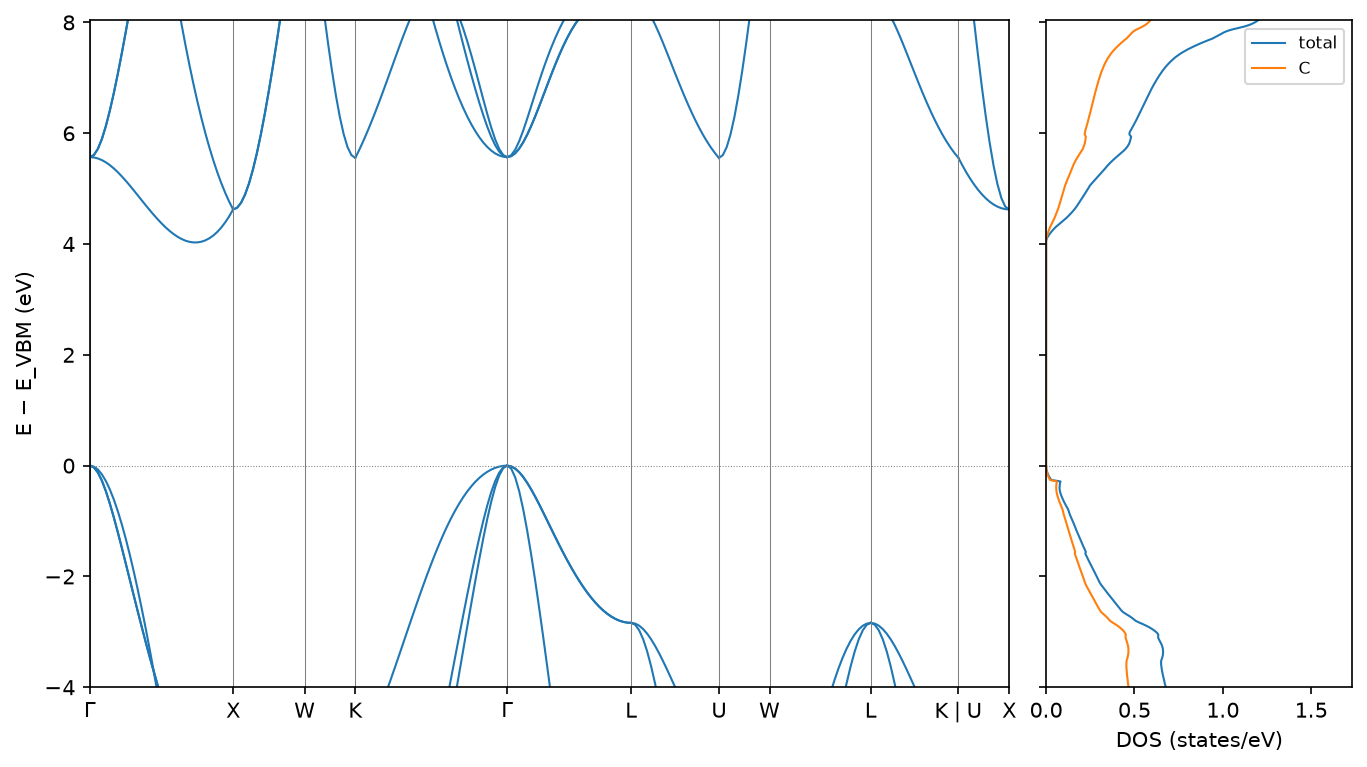
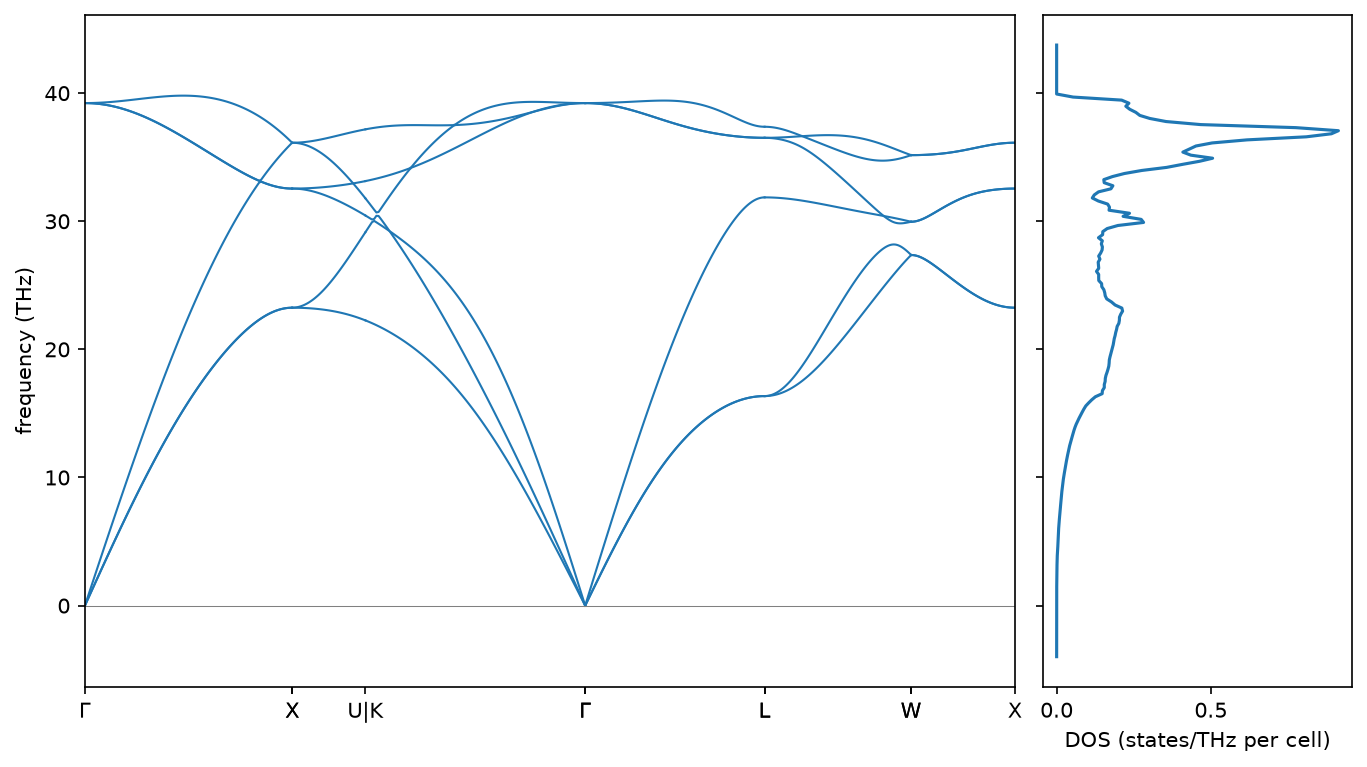
Collect the results into a database
httk collect --into diamond.sqlite --id-base httk.diamond
This stores every finished job of the workspace; --job diamond limits it to
one job and the jobs below it. --id-base sets the prefix of the entry ids
the database mints. The database then holds:
- Structures, each stored once: the input structure, the standardized
cell, and the relaxed cell, which the relaxation produced and the other four
calculations started from. The input structure is stored as httk₂ reads
it, with an alternative that holds
diamond.POSCARread exactly as written and refers to the file itself, so the workflow can be given the same input again. - Results as typed records, such as the band gap, the elastic tensor, the bulk and shear moduli, the dielectric tensors and the zero-point energy.
- Files: each workflow's output document, and each VASP run's atomate2
task document, with a summary such as
VASP 6.6.0, PBEsol Static, 32 cores, 4.946 s. - Runs: one per job, with its name, start and end times, its inputs and outputs, and the jobs it started. A result links to the structure it was computed for.
File entries refer to the files in the workspace by relative URLs, such as
data/diamond/jobs/succeeded/…/run/child-outputs.json, where diamond is the
workspace's name. A file entry is identified by its content (its SHA-256
digest and type), not by where it lies: the same bytes used by many jobs are
one entry.
Serve the database over OPTIMADE
httk serve optimade serve diamond.sqlite --port 8080 \
    --data-path https://example.org/diamond-files
--data-path says where the workspace's files are published: the server
presents data/diamond/… as https://example.org/diamond-files/diamond/….
Without it, file URLs are served as stored. Any OPTIMADE client can now query
the API. Below are a few queries with curl, with the responses shortened; the
ids in your database will differ.
The bulk modulus, and the structure it was computed for:
curl -G localhost:8080/v1/_httk_records \
    --data-urlencode 'filter=_httk_bulk_modulus_hill IS KNOWN' \
    --data-urlencode 'response_fields=_httk_bulk_modulus_hill'
{"data": [{"id": "httk.diamond-1-122", "type": "_httk_records",
   "attributes": {"_httk_bulk_modulus_hill": 451.7092201600964},
   "relationships": {
     "_httk_product_of": {"data": [{"id": "httk.diamond-1-11", "type": "structures",
       "meta": {"role": "subject", "_httk_label": "relaxed_structure"}}]},
     "_httk_is_output": {"data": [{"id": "httk.diamond-1-18", "type": "_httk_runs",
       "meta": {"role": "output", "_httk_label": "bulk_modulus_hill"}}]}, …}}],
 "meta": {"data_returned": 1, …}}
That relaxed structure, the primitive cell of diamond with the cubic lattice parameter a = 3.554 Å:
curl 'localhost:8080/v1/structures/httk.diamond-1-11?response_fields=chemical_formula_reduced,lattice_vectors'
{"data": {"id": "httk.diamond-1-11", "type": "structures",
  "attributes": {"chemical_formula_reduced": "C",
    "lattice_vectors": [[3e-16, 1.7771847853521903, 1.7771847853521903],
                        [1.7771847853521903, 0.0, 1.7771847853521903],
                        [1.7771847853521905, 1.7771847853521903, 2e-16]]}, …}}
The run of the job you submitted, with its timing, its input, and the runs of its five calculations:
curl -G localhost:8080/v1/_httk_runs \
    --data-urlencode 'filter=_httk_name CONTAINS "full-characterization"' \
    --data-urlencode 'response_fields=_httk_name,_httk_started_at,_httk_finished_at'
{"data": [{"id": "httk.diamond-1-29", "type": "_httk_runs",
   "attributes": {"_httk_name": "atomate2.full-characterization: diamond",
     "_httk_started_at": "2026-10-20T06:10:09.084297+00:00",
     "_httk_finished_at": "2026-10-20T07:01:07.068499+00:00"},
   "relationships": {
     "_httk_has_input": {"data": [{"id": "httk.diamond-1-8~file_951f71455ad6fbfe", "type": "structures",
       "meta": {"role": "input", "_httk_label": "initial_structure"}}]},
     "_httk_has_artifact": {"data": [
       {"id": "httk.diamond-1-5", "type": "structures", "meta": {"_httk_label": "standardized_structure", …}},
       {"id": "httk.diamond-1-3", "type": "_httk_runs", "meta": {"_httk_label": "relax", …}},
       {"id": "httk.diamond-1-7", "type": "_httk_runs", "meta": {"_httk_label": "band_structure", …}},
       {"id": "httk.diamond-1-18", "type": "_httk_runs", "meta": {"_httk_label": "elastic", …}},
       {"id": "httk.diamond-1-20", "type": "_httk_runs", "meta": {"_httk_label": "dielectric", …}},
       {"id": "httk.diamond-1-28", "type": "_httk_runs", "meta": {"_httk_label": "phonons", …}}]}, …}}]}
And the task document of the largest VASP run, the 216-atom phonon supercell, at its published URL:
curl localhost:8080/v1/files/httk.diamond-1-18
{"data": {"id": "httk.diamond-1-18", "type": "files",
  "attributes": {"name": "child-outputs.json",
    "url": "https://example.org/diamond-files/diamond/jobs/succeeded/j00004--9ff68de3-…/run/child-outputs.json",
    "description": "VASP 6.6.0, PBEsol Static, 32 cores, 2524.25 s",
    "media_type": "application/json", "size": 1298095,
    "checksums": {"sha256": "3cae441c90cb9d608efe75f8aae2ab94e3b478e0a568aff2cb8d86c64632d0cd"}, …},
  "relationships": {"_httk_is_output": {"data": [{"id": "httk.diamond-1-25", "type": "_httk_runs",
    "meta": {"role": "output", "_httk_label": "task_document"}}]}, …}}}
Each entry type numbers its ids separately, so httk.diamond-1-18 names both a
run and a file here.
The run's input, httk.diamond-1-8~file_951f71455ad6fbfe, is that
alternative of the input structure. It is served at
/v1/structures/httk.diamond-1-8/_httk_alts/file_951f71455ad6fbfe, with
_httk_is_input naming the run and a files relationship to the entry for
diamond.POSCAR, whose checksums give the digest to check a copy against.
The part after file_ comes from the file's content, so the same
diamond.POSCAR gives the same id.
Following the relationships from any entry leads through the runs to the input structure, and from there to every result computed from it. For a production deployment behind a web server, see serving data.